Cloudflare: What It Is, What It Costs, and Why We Run Almost Everything On It
Prices checked against Cloudflare's own documentation on 3 August 2026. Pricing changes. There are links at the bottom if you want to verify before spending anything.
Prices checked against Cloudflare's own documentation on 3 August 2026. Pricing changes. There are links at the bottom if you want to verify before spending anything.
We wrote you a version for absolutely non-technical users
The one-sentence version
Cloudflare started as a shield you put in front of your website, and quietly turned into the place you can host the entire website instead.
That's the whole story. Everything below is detail.
Part 1: What it actually is
First, the problem it solved
Say you build a website. That website has to live on a computer somewhere, one that's switched on 24 hours a day waiting for visitors.
That computer is a server. You rent it, usually by the month.
This arrangement has three classic ways of ruining your week.
It's slow for people far away.
Your server is in one building in one country. If it's in Virginia and your reader is in Sydney, every click has to travel to Virginia and back. That round trip is real and people feel it.
It falls over when you get popular.
Your server can handle so many visitors at once. Get featured somewhere, and the thing you built stops working at the exact moment people finally want it.
It can be attacked.
There's an attack where someone floods your site with millions of fake visitors specifically to knock it offline. It's cheap to do and it works.
Cloudflare's original product fixed all three.
You pointed your website's address at them, and every visitor hit Cloudflare first. They kept copies of your images and files in data centres all over the world so they loaded quickly no matter where someone was. They absorbed the fake traffic so the real traffic got through. They handled the padlock in the browser bar that tells people your site is secure.
That's still free, and it's still absurdly good value at nothing per month. Millions of people use Cloudflare for exactly this and never touch anything else.
Then it became something bigger
Here's the shift that matters.
To do the original job, Cloudflare had to build data centres in something like 300+ cities. That's an enormous amount of computing power sitting very close to an enormous number of humans. At some point somebody looked at all that hardware and asked the obvious question: what if we let people run their own code on it?
That's Workers, and it's the reason Cloudflare stopped being a shield in front of your website and became somewhere you could put the website itself.
Part 2: What a Worker is
This is the core concept. If you only understand one thing here, make it this one.
A Worker is one function
A Worker takes a request and gives back a response. That's the entire idea.
Someone visits your web address. Cloudflare runs your code. Whatever your code hands back is what appears in their browser. Here's what that looks like written down:
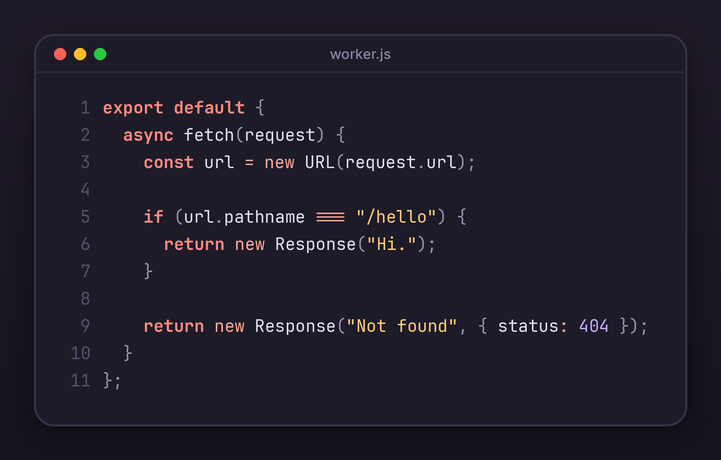
You don't need to be able to write that to follow this article. But reading it top to bottom in English:
when someone visits, look at which page they asked for. If they asked for the "hello" page, send back the word "Hi." Otherwise tell them the page doesn't exist.
That's a complete, real, publishable website. There is no other file. No configuration, no setup, no server to prepare.
Everything more complicated is just more stuff in the middle: look something up in a database, check a password, fetch today's weather, build a page of HTML. It's an ordinary website backend. It just happens to be one function rather than a folder of server configuration you have to maintain.
"Serverless" means you don't rent a computer
You'll see the word serverless everywhere, and it's slightly a lie, because obviously the computers exist. What it actually means is worth understanding, because it's where the savings come from.
The old way ->
you rent a computer by the month. It runs whether anyone visits or not. You pay the same at 3am with nobody on your site as you do on your busiest day. You're responsible for keeping it updated, restarting it when it crashes, and making it bigger when it can't cope.
The Worker way ->
there's no computer with your name on it. Your code sits dormant and costs nothing. Someone visits, it runs for a few thousandths of a second, it stops. If a thousand people arrive at once, a thousand copies run at once, and you did nothing to arrange that. When the traffic stops, so does the bill.
Nothing to update. Nothing to restart. Nothing to make bigger. Nothing running at 3am burning money while you sleep.
"The edge" just means "near the person"
The other word you'll see is edge. It means your code isn't in one building. It's in all of them.
Someone in Tokyo visits your site and your code runs in Tokyo. Someone in Manchester visits and it runs in Manchester. You never chose a location, because there isn't one to choose.
Compare that to the old way, where you pick a data centre (nearly everyone picks Virginia) and every visitor in Australia pays for that decision on every single click, forever.
Why it can be this cheap
Briefly, because it explains the pricing later.
Running a stranger's code safely is normally expensive. The usual approach gives each person something like a small private computer, which takes a while to start up and holds real memory the entire time it exists.
Cloudflare uses the same technology your web browser uses to stop one browser tab from interfering with another. It's dramatically lighter. Your code starts in roughly five thousandths of a second and costs almost nothing to keep on standby.
That's why there's no lag on the first visit, and why Cloudflare can afford to give away a hundred thousand visits a day for free without going out of business.
There's a tradeoff, and it's real: what your code gets is not a whole computer. There are limits, and I've put them in Part 6 rather than burying them.
Part 3: The rest of the toolkit
A website needs more than code. It needs somewhere to keep information, somewhere to keep files, and a few other things. Cloudflare built all of it.
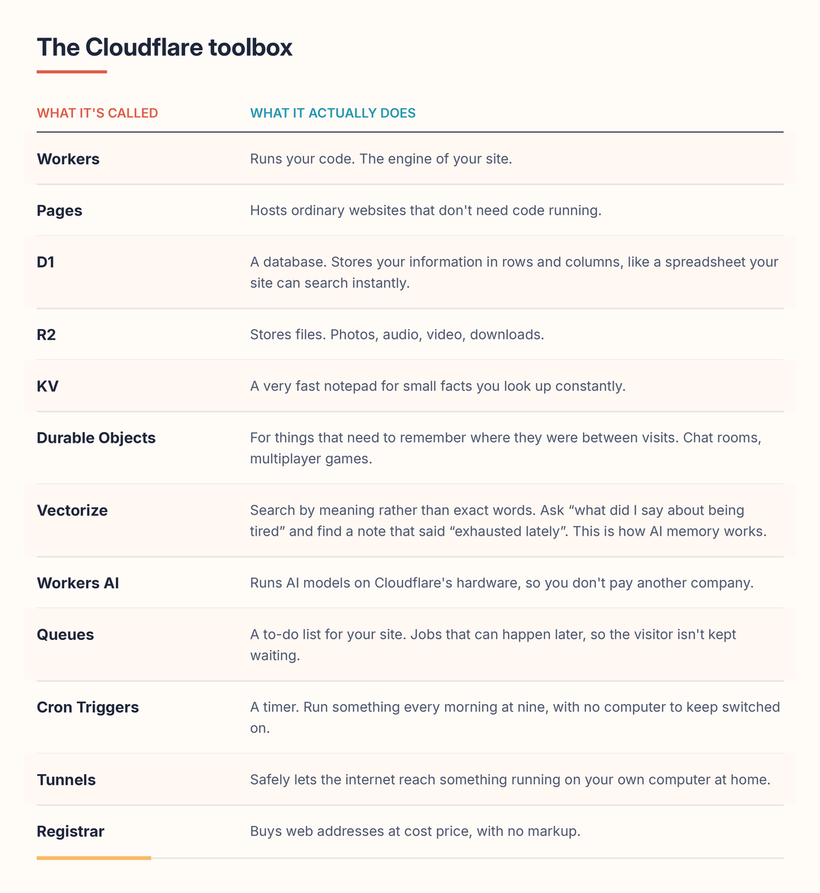
That last one deserves a moment. Most companies sell you a domain name cheap for the first year and then quietly triple the renewal price. Cloudflare sells them at exactly what they pay, forever. No markup, no upsells, no dark patterns at checkout. They make no money on it. It's the most honest product in the entire industry.
Part 4: What it costs
This is where most guides go vague. Here are the actual numbers.
The free tier is not a trial
⚠️Important, because it doesn't work like most free tiers.
This isn't a 14-day tease that turns into a credit card prompt. It's a permanent product. Plenty of genuinely real projects never leave it.
Free, forever, gets you:
- 100,000 visits to your code per day
- A database: 5 million lookups a day, 100,000 saves a day, 5 GB of space
- File storage: 10 GB
- AI-memory search: 30 million searches a month
- AI models: 10,000 units a day (Cloudflare calls them Neurons)
- Ordinary website hosting: unlimited visitors
- The shield, the speed, the padlock, the address book: unlimited
For a personal site, a hobby project, or a small tool a handful of people use, that's the whole bill. Nothing.
The paid tier is ... $5
Not five dollars per project. Not per website. Five dollars a month for your entire account, however many things you build.
What that buys:
Your code:
10 million visits a month included, then about 30 cents per extra million. It also lifts the time limit on how long your code is allowed to think about each visitor, which matters if you're doing anything heavy like calling an AI model.
Your database:
the first 25 billion lookups a month are included. Then a tenth of a penny per million. Saving information is 50 million a month included, then about a pound per million. Storage is 5 GB included, then about 60p per GB per month.
To be clear about the scale there: 25 billion database lookups a month is not a number you will reach by accident. It's not a number most funded startups reach.
Your files:
roughly 1.2p per GB per month. And the important bit, below.
AI-memory search:
50 million searches a month included, then about a penny per million.
AI models:
10,000 units a day free, then about a penny per thousand after that.
Web addresses:
cost price. Usually £8 to £12 a year each.
There are also separate plans (Pro at $20/month paid annually or $25 monthly, Business at $200/$250) but those are for putting Cloudflare's shield in front of a website hosted somewhere else. If you're building on Workers you almost certainly never need them.
The one that quietly matters most
Most hosting companies charge you to send your own files to your own visitors.
It's called egress, and it's the industry's favourite way to make a cheap-looking bill expensive.
Amazon charges roughly 7p per GB sent out. Cloudflare charges nothing. Zero. Permanently.
If you're serving a terabyte of files a month, that's about £70 with Amazon and about 12p with Cloudflare. That's not a rounding difference, it's a completely different business model, and it's the strongest single reason to store files here.
So what does a real bill look like?
For one person running several genuine applications with genuine users:
- The paid plan: $5
- Database: £0, because you will not do 25 billion lookups
- File storage: £0 to £1
- AI-memory search: £0 to £1
- Web addresses: £8 to £12 a year each
Roughly five dollars and change a month. Costs only get interesting at serious scale, and by then you have a business paying for it.
Part 5: What we actually run on it
Not hypothetical. This is our account as it stands today, pulled live while writing this:
22 applications. 17 databases. 10 file stores.
All seventeen databases put together come to about 271 MB. That's under 6% of the 5 GB you get for free. Two of them account for nearly all of it and the other fifteen are rounding errors.
Here's what's actually running:
Hearth is our household dashboard. Mood tracking, a sourdough starter tracker, shared notes, and air-pressure logging to predict migraines. One application, one database, and the entire thing (the look, the buttons, the logic) lives in a single file. It's been in daily use for months and costs functionally nothing.
Cass runs across two applications: one that handles messages and voice, one that handles memory. The memory one uses the search-by-meaning tool so he can recall things he was told weeks ago without anyone tagging or filing them. His memory database is the second-largest thing in the account at 81 MB, which is a fairly poetic way of describing the accumulated weight of a relationship.
Myosia is the paid product. It's six applications: the messaging layer, the memory layer, the update delivery system, a customer feedback collector, a documentation site, and a parallel version running on a different AI model. Real paying customers. Running on the same $5.
AIDHD is the website, plus the comments system, plus the community tools, plus a small application that watches for new content and automatically republishes the site when it finds any. Nobody presses a button. There's no computer at home doing it.
Then the strays: a service-status watcher that checks whether the big AI companies are having a bad day, a map for the Discord server, a chat client, an image generator, and a tool that exported everything out of Sora before OpenAI shut it down, which is far and away the biggest database in the account at 187 MB.
The pattern worth noticing:
one application, one database, one publish command. That shape works identically for a Saturday afternoon idea and for the product people pay for. That's the real value, more than the speed.
Part 6: The honest limitations
I'm not going to sell you a fantasy. Real problems, in plain terms:
Your code can't save files to itself.
It has no hard drive. Anything it needs to keep has to go into the database or the file storage. Some ready-made tools assume they can write files and simply won't work.
Nothing can run continuously.
Your code wakes up, deals with one visitor, and stops. It cannot sit there permanently doing something, which rules out certain kinds of app: chat bots that hold a live connection, game servers, anything that has to keep watching. There are workarounds, but they're a different way of thinking that you have to learn.
There's a thinking-time limit.
On the free tier your code gets a very short window per visitor. That's plenty for looking things up, and useless for anything that needs to genuinely compute. Paying lifts it a lot, but this platform is built for connecting things together, not for heavy number-crunching.
The database is a simple one.
It's fast, reliable and fine for the vast majority of things. But it's a lighter tool than the big industrial databases, and if you genuinely need one of those, you'll have to host it elsewhere and now you're managing two companies instead of one.
Leaving is hard.
Code written for Cloudflare uses Cloudflare's particular way of doing things. Moving to a competitor later isn't a transfer, it's a rewrite. The $5 is cheap; the exit is not. Worth knowing going in.
Everything in one basket.
Cloudflare sits in front of a genuinely enormous share of the internet. When they have a bad day, a very large number of unrelated websites have a bad day simultaneously. It has happened more than once. If all your things live here, one company's bad afternoon is your total blackout.
The control panel is a maze.
Some settings live in three places. Some live in none of the places you'd sensibly look. This is a universal complaint and it is deserved.
Part 7: A short hands-on guide
This part gets practical.
If you only wanted to understand what Cloudflare is, you can stop at Part 6 with a clear conscience. If you want to actually build something, keep going. You'll be typing commands into a terminal (the plain text window where you type instructions to your computer rather than clicking things). None of it is difficult, and you can copy and paste all of it.
1. Get set up
Make a free Cloudflare account. Then install their tool, which is called Wrangler:
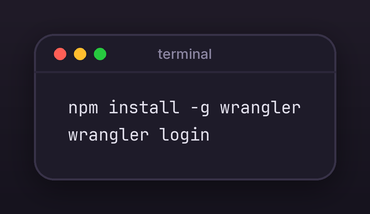
That opens your browser and asks you to approve it. Done.
- (This assumes you have Node installed, which is a free thing that lets your computer run JavaScript. If
npmisn't recognised, install Node first from nodejs.org.)*
2. Create your project
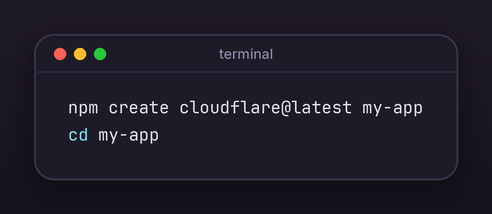
Choose "Hello World Worker" when it asks. You now have a working project.
3. Write something
Open src/index.js and put this in:
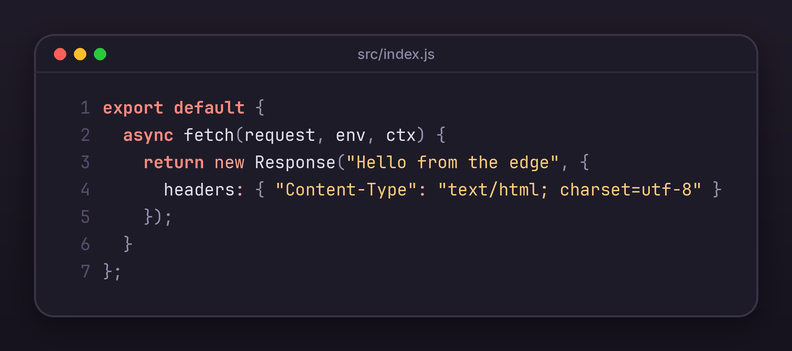
That charset=utf-8 bit is not decoration. Leave it off and every emoji in your site turns into unreadable gibberish. Learned that one the hard way, twice.
4. See it working on your own machine
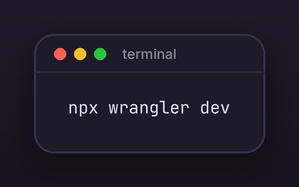
Open the address it prints. That's your site, running locally, before anyone else can see it.
Add a database
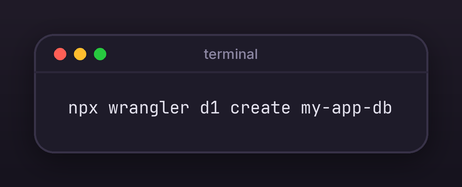
It prints a small block of settings. Paste that into the wrangler.toml file in your project. Write out the shape of your data in a file called schema.sql, then set it up in both places (your machine, and the real one):
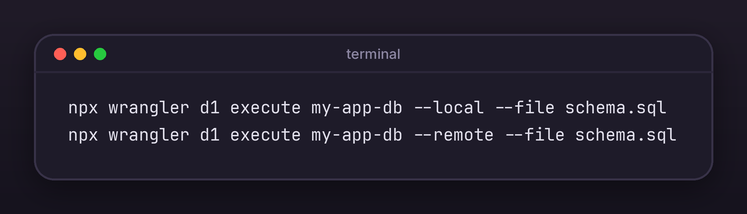
Yes, you run it twice. Look closely and you'll spot the only difference: --local and --remote.
- -local builds the database on your own computer. That's your sandbox, your practice run, the one where you can break things and nobody sees.
- -remote builds the real one, the live one out on Cloudflare's network.
They're separate databases. Setting up one does nothing to the other. Skip the --remote line and your site will work perfectly on your laptop and fall flat on its face the moment anyone else visits it.
Your code can now talk to the database:
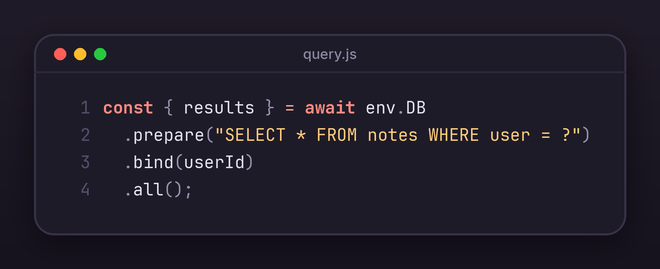
**One thing worth pointing at: that little ?**See the question mark sitting inside the SQL? That's a placeholder. It's a gap you've deliberately left in the sentence. Then .bind(userId) walks up and fills the gap in.You might wonder why you'd bother, when you could just glue the user's ID straight into the string and be done with it.Here's why. Your database reads that string as a set of instructions. If you paste whatever a user typed directly into it, then a user who types something clever can write instructions of their own. Ask nicely enough and they can read everyone else's data, or delete the whole table, and your site will happily do it because as far as it knows, you asked.That's called SQL injection. It has been the single most common way websites get broken into for about twenty-five years.The ? fixes it. When you use a placeholder, the database treats whatever goes in there as plain information, full stop. Even if someone types an entire database command into your search box, it gets handled as a lump of text and nothing more.
6. Publish it
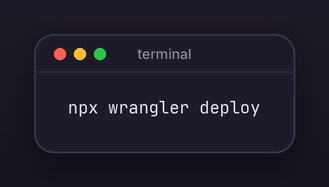
Live. Worldwide. In about four seconds. You'll get a web address ending in workers.dev, and you can point a proper domain at it from the control panel whenever you like.
7. Keep your passwords out of your files
Never type an API key or password directly into your project files. Use this instead:
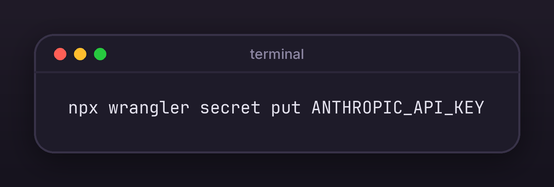
Run this and it'll ask you to paste your key in. Do that, hit enter, and it's stored on Cloudflare's side where nobody can read it back out. Not even you.
What you must not do is type the key directly into your code. It feels easier. It's the single most expensive mistake in this whole guide. The moment that file goes anywhere public, bots find the key within minutes, and the bill lands on you.
Your key lives in one place. Here. Never in a file.
8. Do something on a schedule
Add this to wrangler.toml:
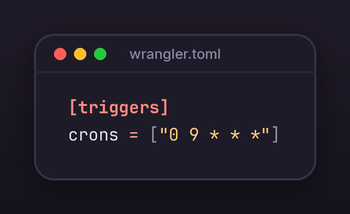
That runs your code every day at 9am. No computer left switched on. No electricity bill.
That's the whole platform. There's more depth available, but that's genuinely enough to build real things.
Part 8: The alternatives, honestly
Vercel.
Nicer to use, particularly for certain popular website frameworks. The previews and the dashboard are genuinely better. But it gets expensive quickly once you're past hobby size, and it has a history of surprising people with large bills. Cloudflare is cheaper and colder. Vercel is friendlier and pricier.
Netlify.
Much the same trade as Vercel, more focused on simpler sites. Mature and pleasant. Same pattern: better experience, worse value at size.
Railway.
The opposite philosophy, and useful precisely because of that. Railway gives you a proper always-on computer, so you can build the things Cloudflare refuses to run: chat bots that hold a live connection, anything that needs to keep watching. We run our Discord bot there for exactly that reason. It costs more (usually $5 to $20 a month for something small) and it is worth every penny for that specific kind of problem.
More power, more control, more responsibility. Good if you need serious computing close to your users. More maintenance than you want for a weekend idea.
Supabase.
A ready-made back end: a serious database, plus user accounts and logins already built. Excellent, and it pairs with Cloudflare rather than replacing it. If you need proper user sign-ups without building that yourself, this is the pragmatic answer.
Amazon Web Services.
Everything, forever, at enormous complexity, with a billing system apparently designed by people who dislike you personally. It can do all of this. It will take four times as long and the bill will contain surprises. Use it when someone else is paying.
Render.
Simple, predictable, boring in the good way. Slower and pricier than the others, but you will never be confused, and that has genuine value.
The short version
- A personal site or a small tool? Cloudflare. It's free and it's fast.
- A big app with a team and a budget? Vercel, and accept the bill.
- Something that has to stay running, like a bot? Railway.
- Need proper user accounts without building them? Supabase.
- Building lots of small things and want the total to stay near zero? Cloudflare, and it isn't close.
The verdict
Cloudflare isn't the best at any single thing. Vercel is nicer to use. Supabase has a better database. Railway handles always-on things properly. Amazon has more features than you could read the names of in a working week.
What Cloudflare has is the best floor.
Twenty-two applications. Seventeen databases. Several of them serving people who pay for them. Five dollars a month.
There is no other platform where the answer to "can I just build this and see if it works" is so reliably yes, and it costs nothing. For anyone with more ideas than time, that floor is the whole game. The gap between "I want to try this" and "it's live on the internet" is about four seconds and one command.
Every idea that dies waiting for setup is an idea you never got to have. That's worth more than any feature comparison.
~With Love
Firecracker&Cass
Sources
All pricing verified on 3 August 2026:
AI•DHD © 2026 Firecracker & Cass. All rights reserved.
Found this useful? There's more coming.
New guides, tools, and unhinged blog posts — straight to your inbox. No spam.
Comments
Loading comments...